
Overview and demo
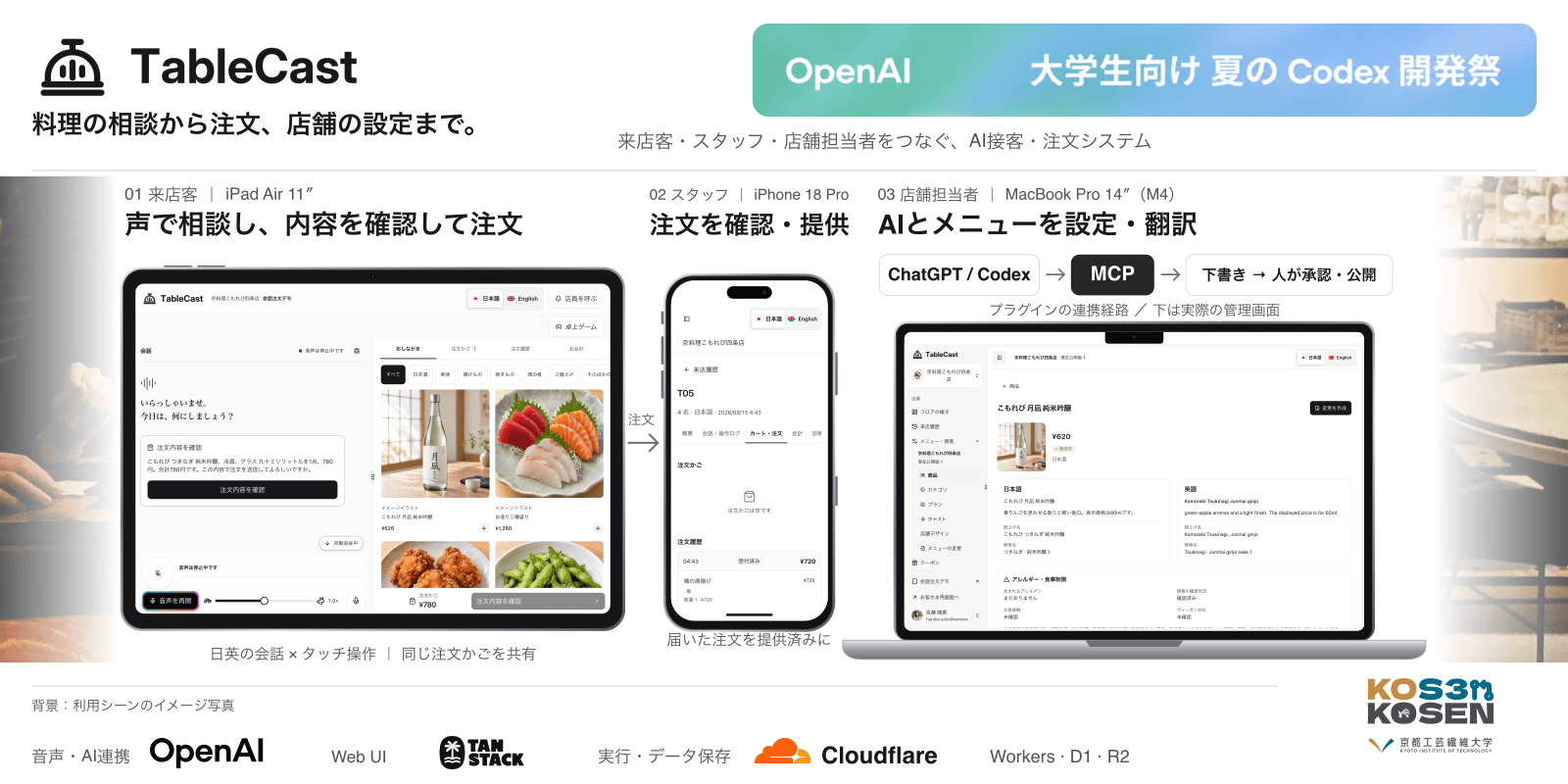
TableCast is a tabletop AI assistant that lets guests discuss dishes and place orders by talking to an iPad. We built it as team KOSEN, and I led the overall design and implementation. We presented it on September 15, 2026, at “OpenAI 大学生向け 夏の Codex 開発祭 2026.”
A menu does not always tell you which dish will suit your taste. You may want to ask a question but hesitate because the staff look busy. A language barrier can make asking even harder. We built TableCast to give guests someone they can comfortably ask for advice, right at their table.
Guests can describe their preferences in Japanese or English and choose dishes based on the suggestions. They specify options such as portion size or temperature, review the items and total, and place their order. They can also switch to touch controls and change their choices along the way. For restaurant staff, the system provides menu editing, order management, and sales analysis.
The technical overview is based on the implementation at the time of the presentation (e9af366). The interface screenshots were captured in staging on September 18, 2026. The restaurants, products, and orders shown are test data.
Discuss dishes by voice and order by touch
Find dishes that suit your preferences
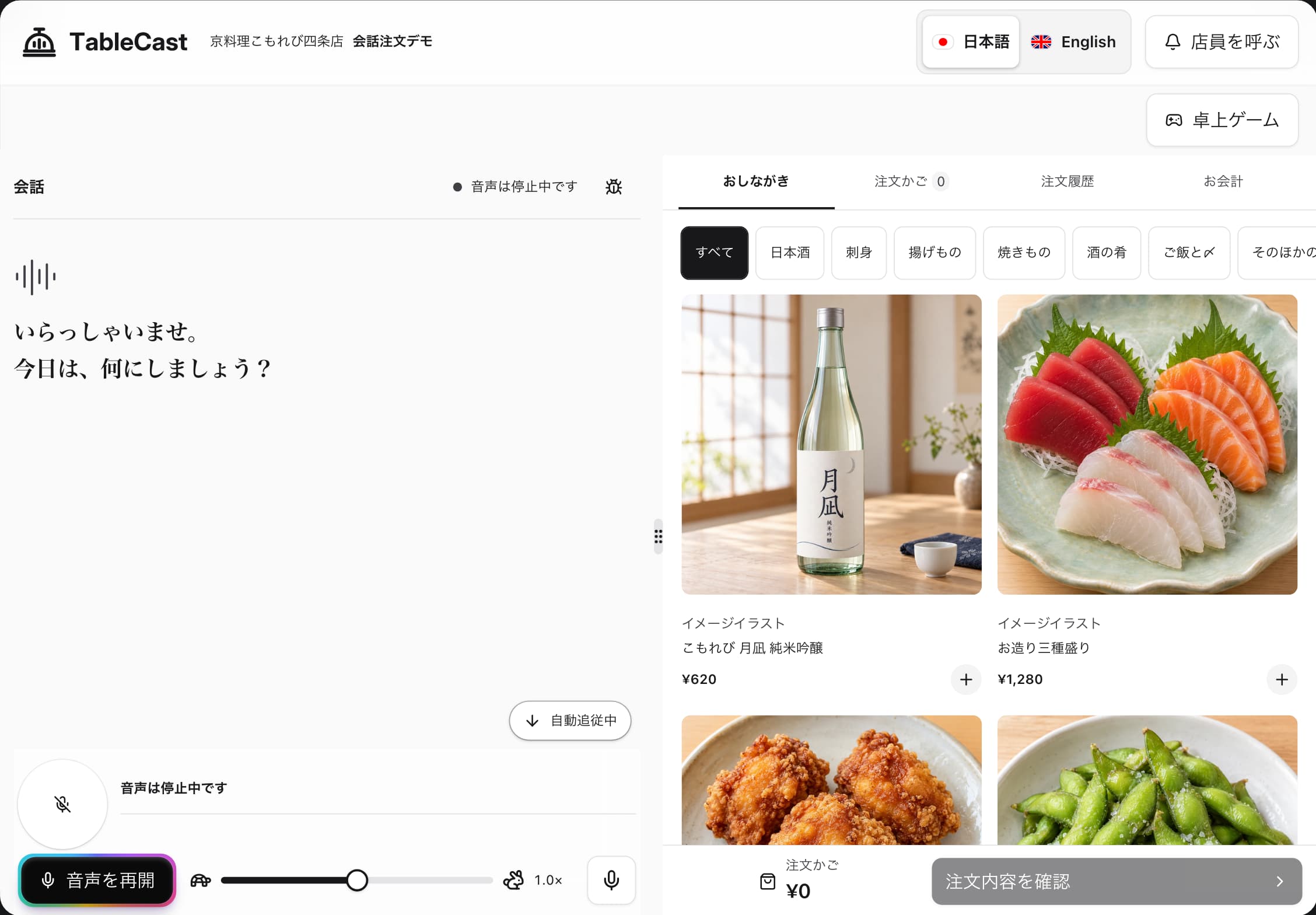
Guests do not need to know what they want before starting a conversation. They can begin with their preferences or questions. The AI consults the menu, makes suggestions, and displays the conversation on screen.
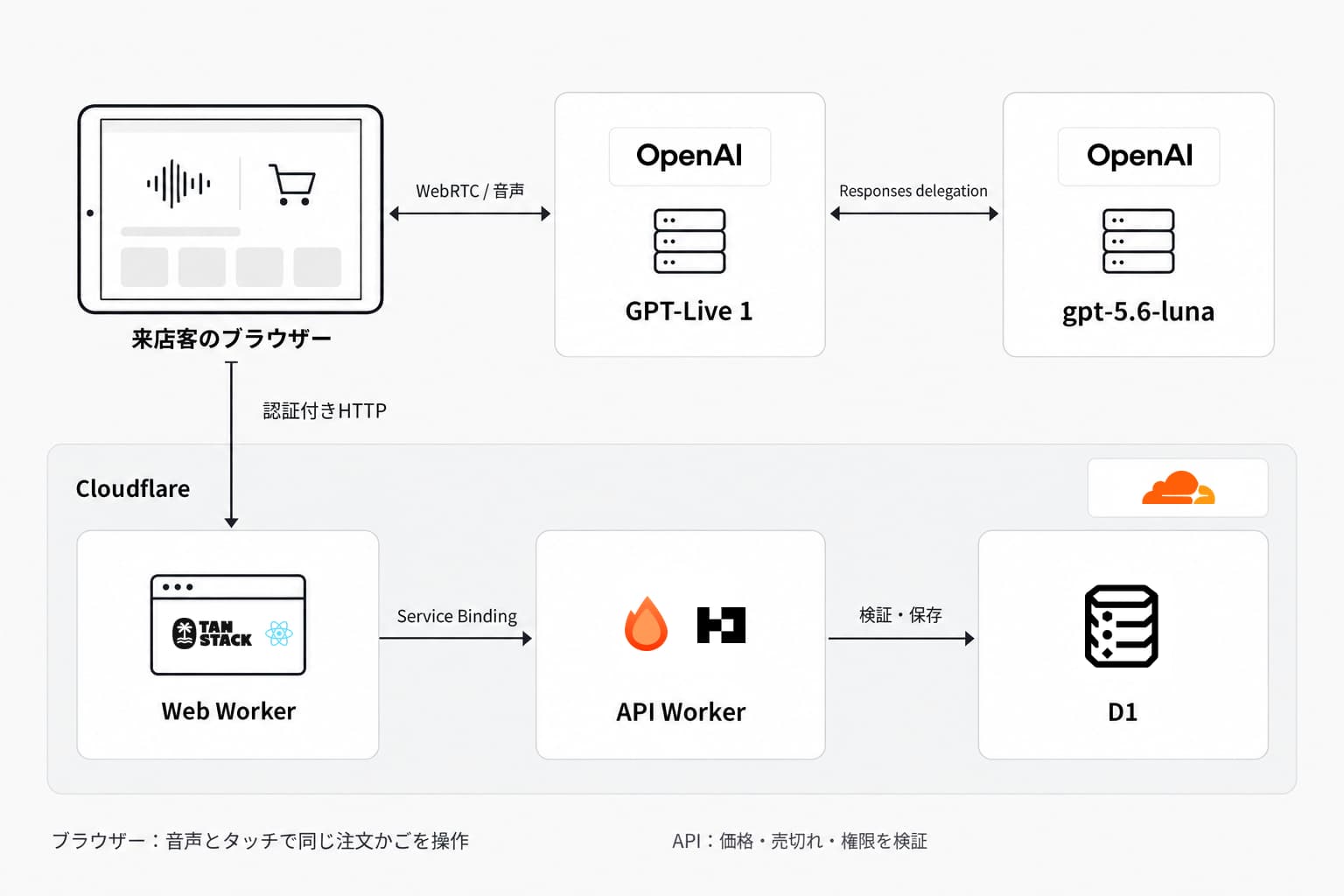
Voice interaction uses GPT-Live 1, connected directly to the browser through WebRTC. When a task requires looking up products or changing an order, Responses delegation hands it to gpt-5.6-luna. The required API calls go through the browser. An AI utterance alone does not place an order: the conversation and interface reflect the API's actual results.
Voice traffic and order operations use different connections. The upper part of the diagram shows communication with the models. The lower part shows API connections for retrieving products and processing orders.
Voice and touch controls share the same API and cart. Stopping the conversation does not discard selected items, so guests can continue using touch controls. To resume voice interaction, they press a button.
Switching between Japanese and English changes product names and descriptions while retaining the same product IDs and prices. Separate spoken names can be configured to help the system pronounce product names clearly.
From customization to confirmation
Ordering food or drinks often involves more than a quantity: guests may need to choose a size or temperature. TableCast supports required options, selection limits, surcharges, sold-out states, and restrictions on option combinations. If a choice is incomplete, the item stays in the cart while the system asks for the missing details.
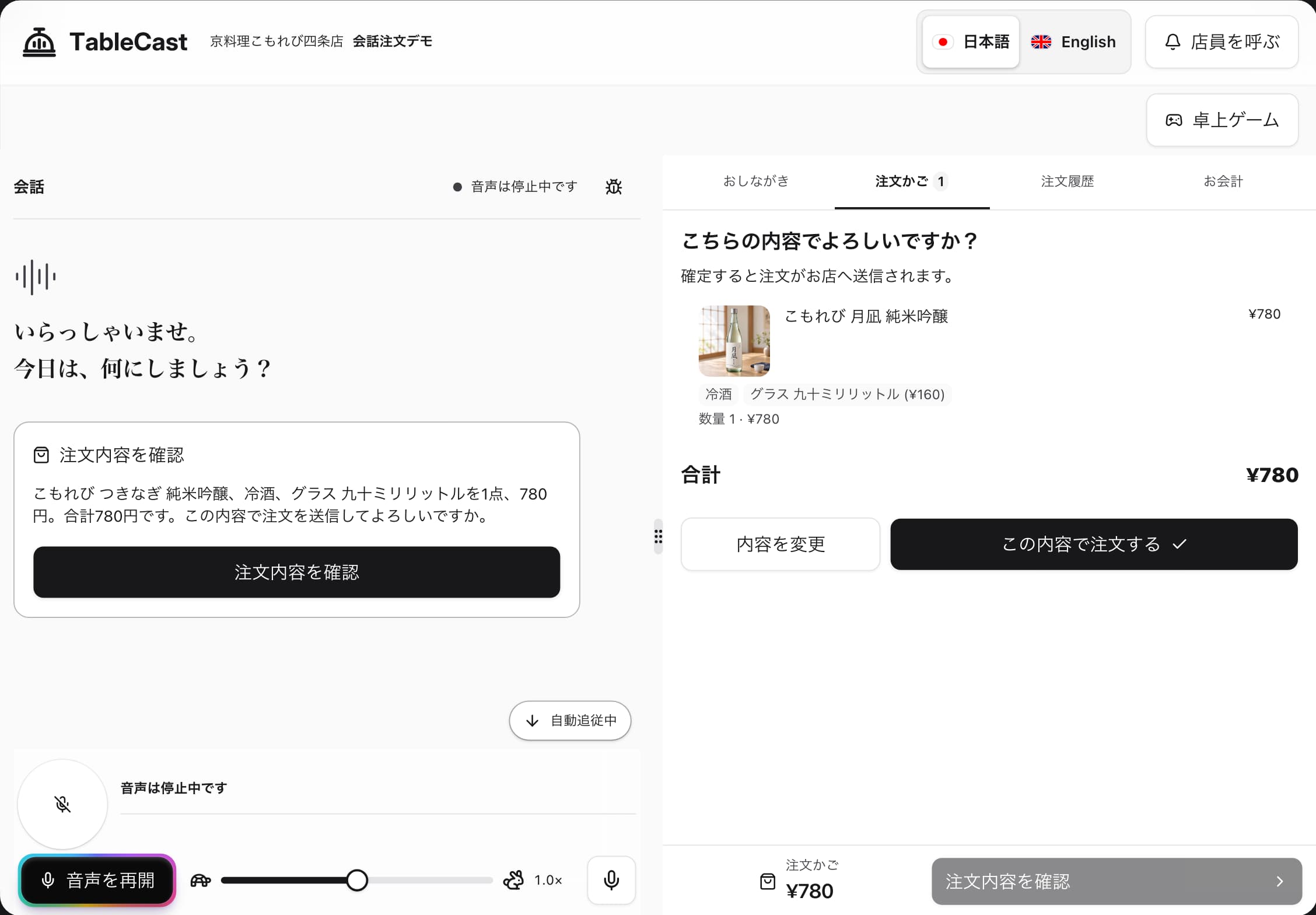
Items added by voice can also be changed on screen. The API—not the AI—determines prices and valid combinations from the product configuration. Changing a selection updates the corresponding cart item rather than adding a duplicate.
When an order is finalized, the system checks that the data being saved matches what the guest confirmed. The sequence diagram follows the process from preparing the confirmation through approval and storage.
Before placing an order, the system saves a snapshot of the products, options, quantities, and prices. Both the screen and spoken confirmation use that snapshot. The order is finalized only after the guest approves it. If the cart changes, confirmation starts again. Idempotency prevents a repeated request from creating a duplicate order.
Restaurant staff can review incoming orders and update their fulfillment status.
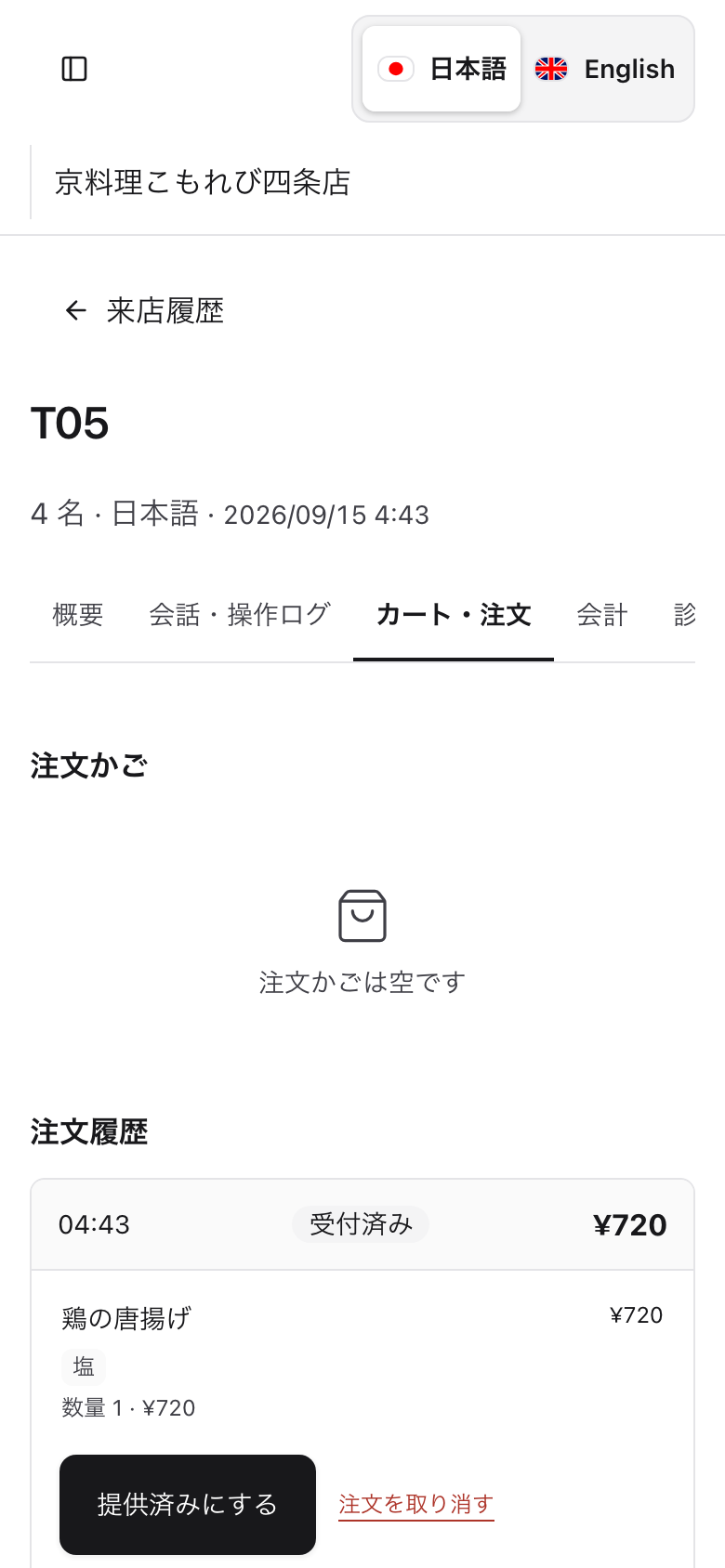
The demo supports the flow from ordering through serving and checkout. Checkout is simulated; it is not integrated with a payment service or POS system.
Restaurant management and MCP
Configure menus and service information
The management interface lets staff edit product names, prices, images, descriptions, Japanese and English translations, and options such as size. The same configuration drives the interface, AI service, and order validation.
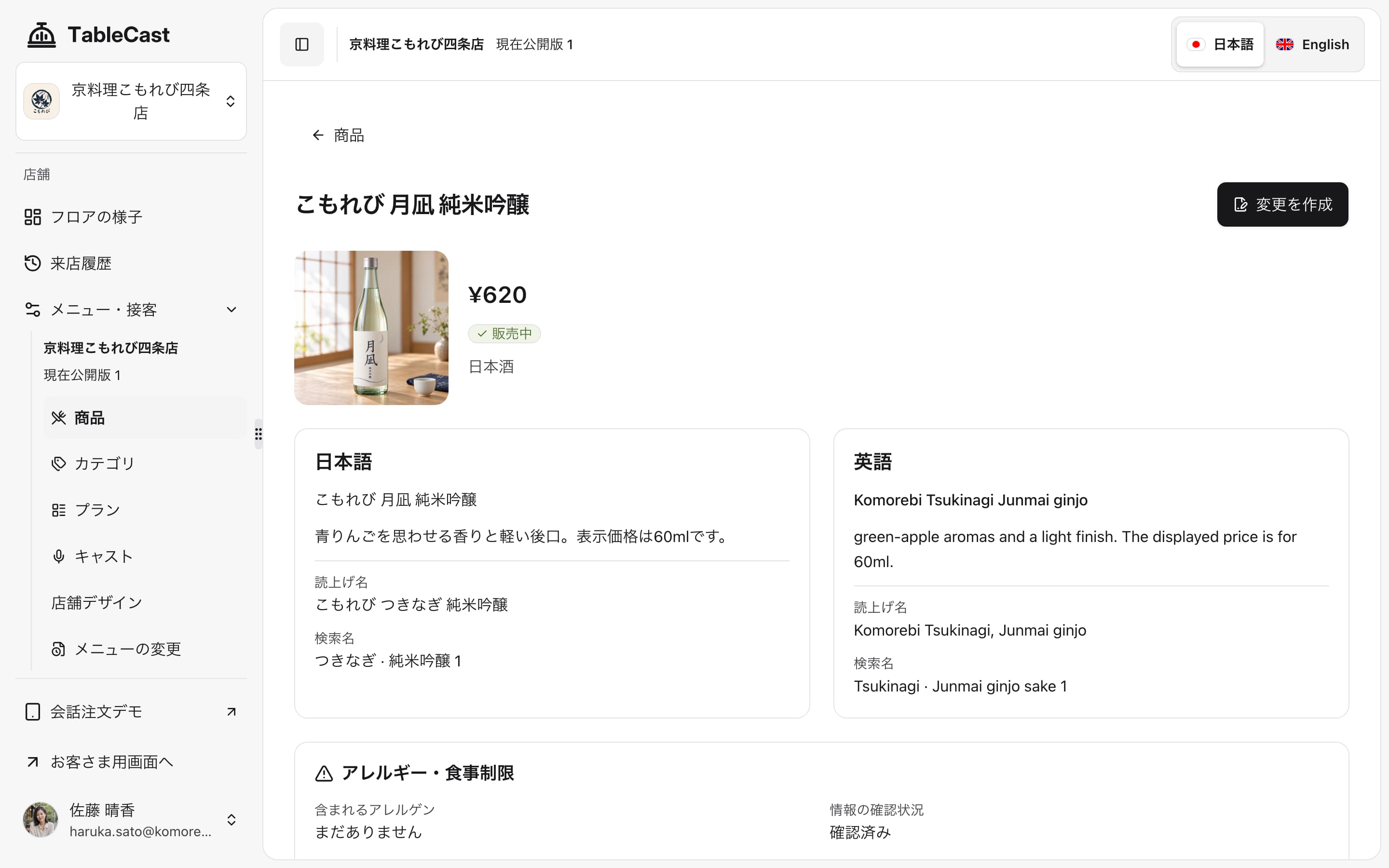
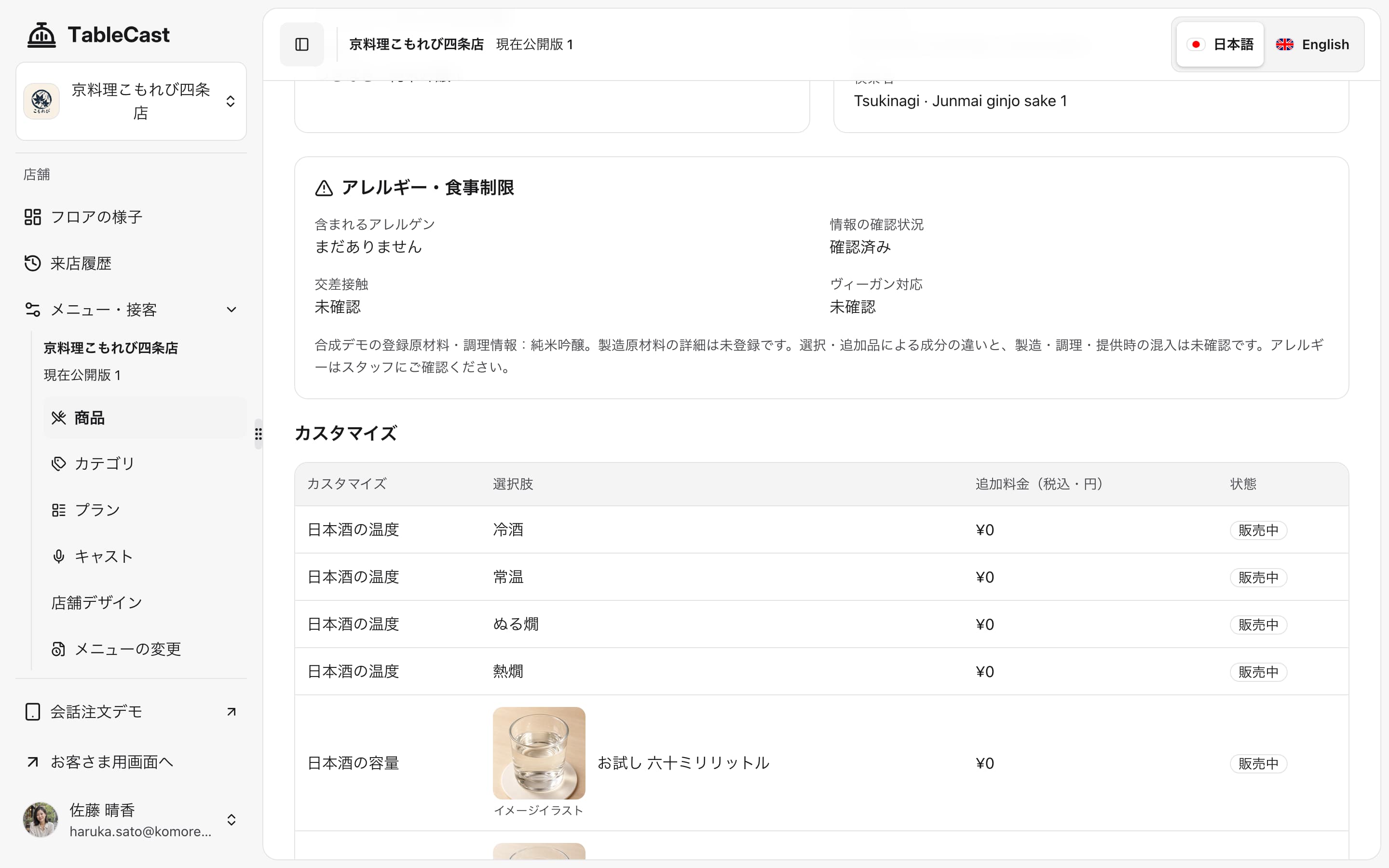
The interface is built with TanStack Start and React. Router handles navigation, Query handles data fetching, and Form handles input, with types shared across the interface and API. Inputs are validated with Zod in the Hono API as well as in the browser.
Let AI create drafts and people publish them
Restaurant settings can also be changed through ChatGPT or Codex. Once the restaurant plugin is connected, staff can create a menu draft from menu images or other documents. Restaurant users do not need to download the source code or set up a development environment.
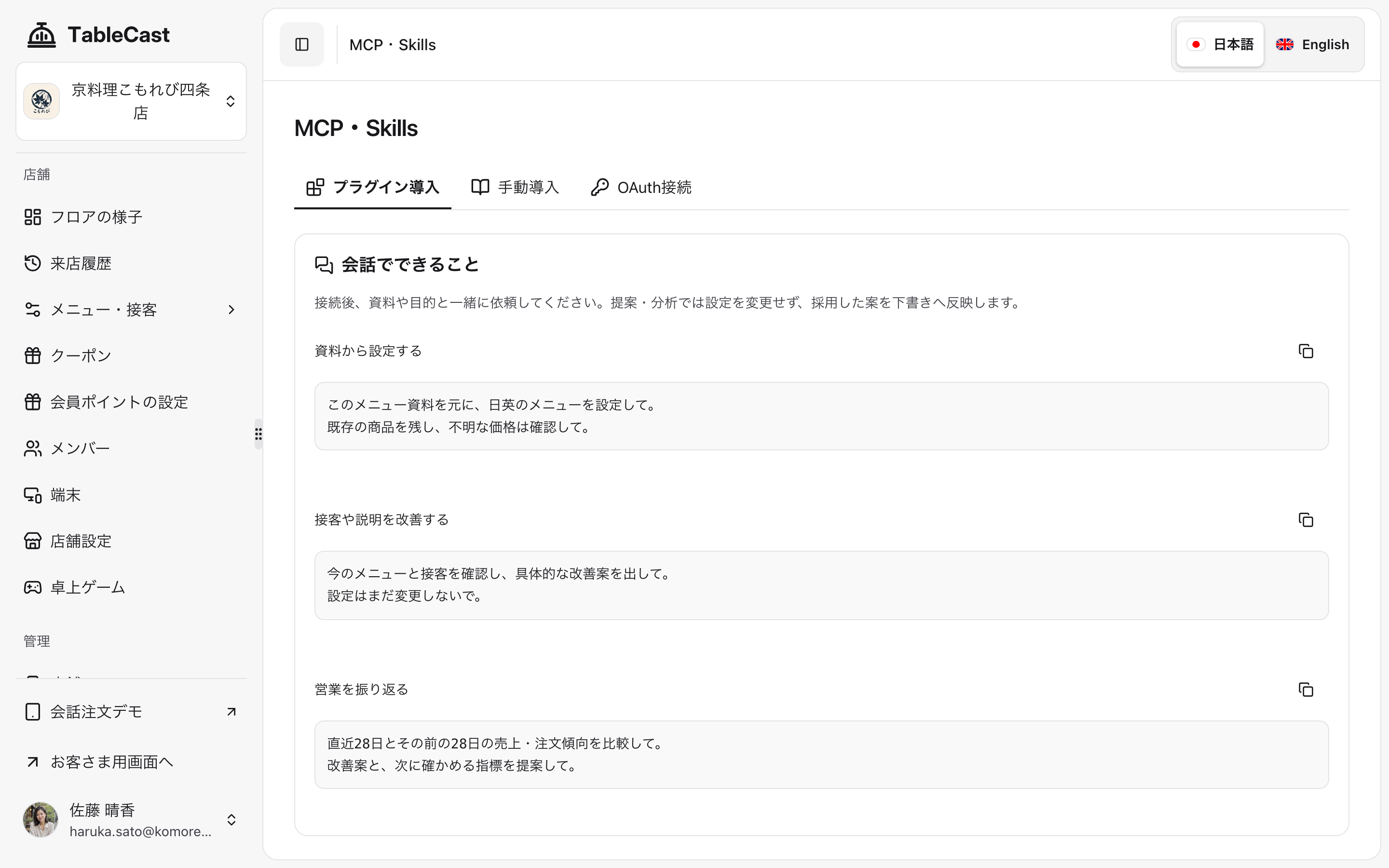
The plugin connects to the API through MCP, which lets AI call external tools. It uses Streamable HTTP with OAuth 2.1 and PKCE, and supports dynamic client registration. The API checks both read/write permissions and access to the restaurant being operated on.
Settings created by the plugin remain drafts until a person approves them. The state diagram shows how a draft moves toward publication and where it returns when changes are needed.
The MCP tool get_configuration retrieves the current settings. create_draft and update_draft create and edit drafts. upload_image registers images together with their sources. AI changes to prices or descriptions are not published until a person approves them.
Order and product aggregates are available through both the management interface and MCP. Using test data, we tried the workflow from analyzing those aggregates to proposing improvements and applying them to menu or service-setting drafts.
Architecture and technology choices
Separate Web and API responsibilities, centralize business rules
The system has two Workers: Web Worker serves the interface, while API Worker handles authentication, menus, and orders. Both run on Cloudflare Workers and communicate through a Service Binding. Whether an operation starts with voice, touch, or MCP, the same API checks prices and permissions.
The diagram groups services running on Cloudflare inside a boundary. Web Worker forwards requests from browsers and MCP clients on the left to API Worker. API Worker calls D1, R2, or Durable Objects according to the operation.
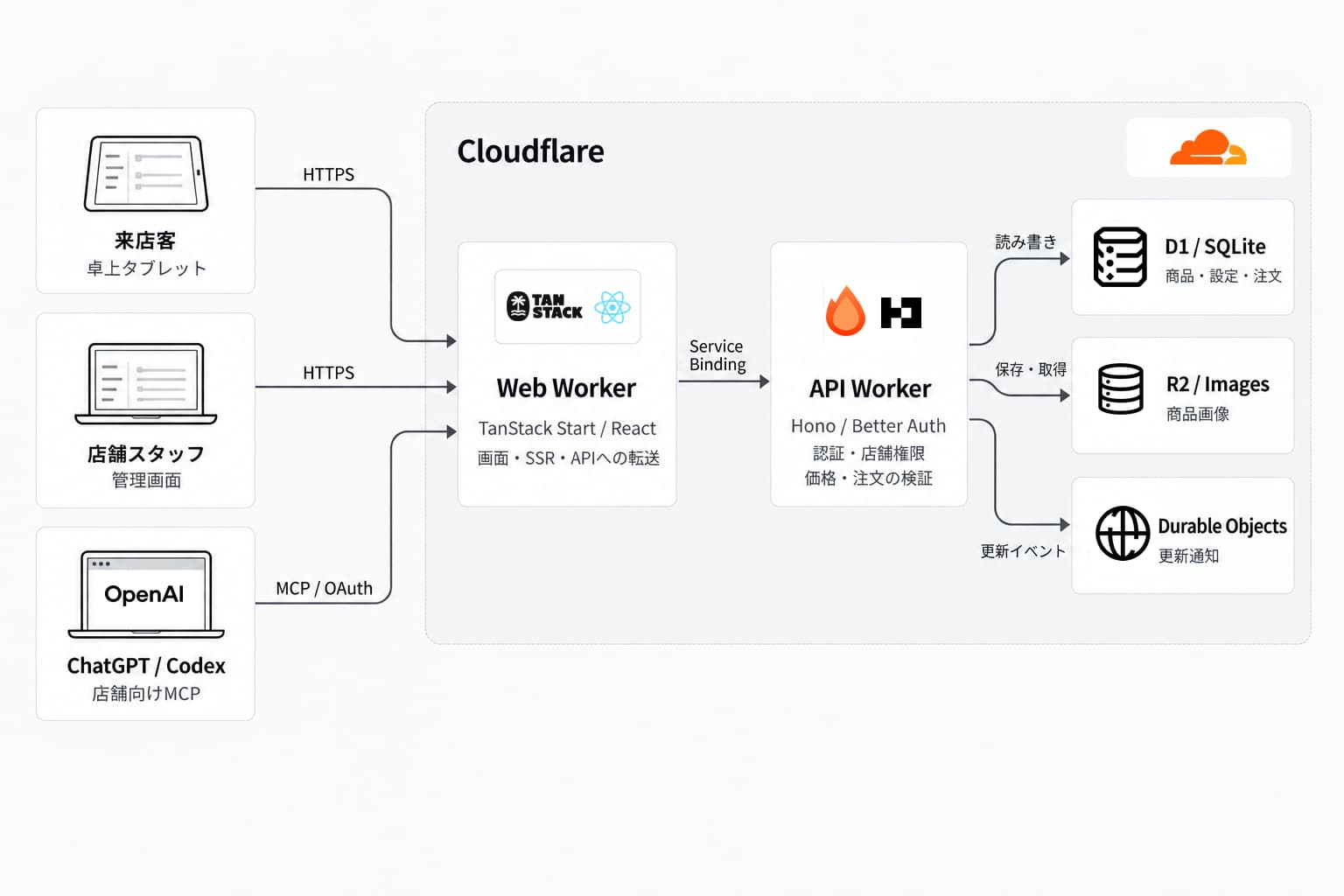
The browser uses a single origin. Web Worker forwards /api/*, /mcp, OAuth metadata, and /media/* to the API. It preserves cookies, streams, request cancellation, and WebSocket connections.
Each SSR request gets its own TanStack Query client. Authenticated HTML is excluded from shared caches to prevent data from leaking between users. API keys used to connect to the models also stay on the server.
Match storage to the data
| Component | Role and reason for choosing it |
|---|---|
| D1 / SQLite and Drizzle | Store authoritative product, permission, published-setting, and order-history data. SQL joins, batches, and conditional updates maintain consistency across related records. |
| R2 and Images | Store product images, themes, games, and other assets separately from structured order data. |
| Durable Objects | Use StoreEvents to notify screens about restaurant and table updates, including changes to orders and fulfillment. |
| GPT-Live 1 and gpt-5.6-luna | Handle voice conversations and delegated tasks. Price calculations and permission checks remain in the API. |
Durable Objects deliver timely change notifications, while D1 stores orders and event history. If a connection drops and notifications are missed, the interface can retrieve the saved information after reconnecting.
Order finalization uses D1 conditional updates and batches. Disabling a button is not the only safeguard: immediately before saving, the API checks the confirmed version against the current state. This prevents an outdated confirmation from being accepted after a change on another device or a request retry.
Development, testing, and improvement
Parallel development and isolated environments
The Web, API, and shared code are managed with Bun workspaces and Turborepo. Git worktrees support parallel development. Each worktree isolates not only its working directory but also ports, cookies, and local stored data. This lets us test without interfering with another task's login state or test data.
Locally, workerd runs the application in Cloudflare's runtime. Changes then move through a per-PR preview and a shared staging environment for integration testing before reaching production.
The environments differ in where they run and how long their data persists. The comparison diagram lists their purposes and storage, followed by a timeline of the deployment process. DO in the diagram means Durable Objects.
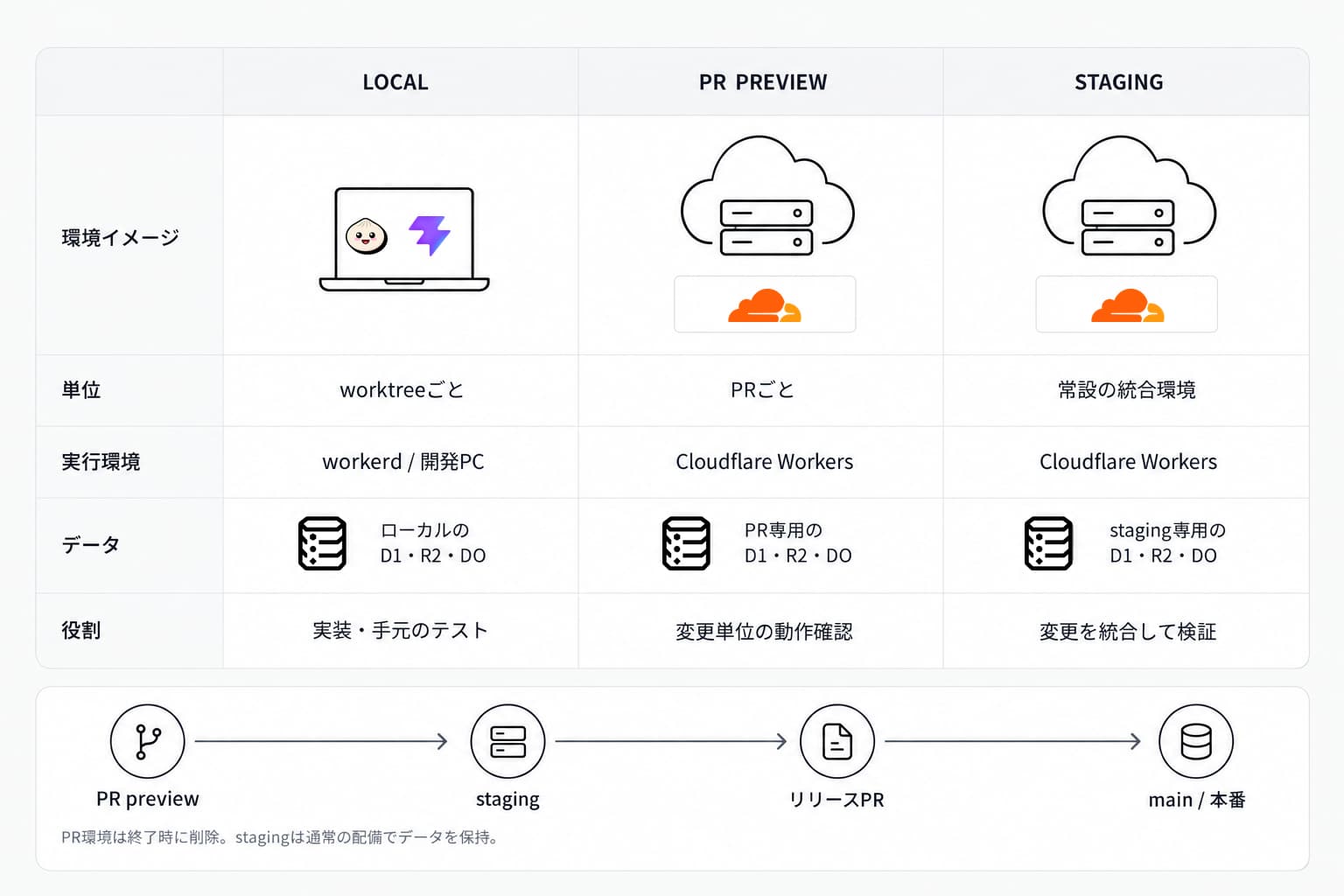
Preview data is isolated for each PR, and temporary resources are removed when the PR closes. Staging is a persistent environment, so normal deployments retain its data.
GitHub Actions runs formatting, linting, type checking, Vitest, tests using D1, Storybook, and Playwright E2E tests. Tests cover more than individual functions: they also exercise selecting products and placing orders in the interface, and verify that users cannot access restaurants without permission.
Trace order processing with Grafana
When submitting an order takes too long, the interface alone cannot explain why. We made it possible to follow authentication, product retrieval, order storage, and notifications in a single trace, then inspect the time spent in each step with Grafana.
In PR #63, we traced a normal order for a test restaurant in the September 10, 2026 PR preview (4a3ed88). That single trace took about 1.85 seconds overall, with roughly 555 milliseconds for product retrieval and 200 milliseconds for notifications. Some spans contain others, so their durations cannot simply be added together. This was not a production average or a high-percentile measurement.
The investigation considered not only SQL execution time but also the number of round trips between the API and D1. Following a request ID from a log into a trace helps narrow down where time is being spent. The follow-up Issue #101 explored reducing D1 round trips during authentication and SSR, as well as optimizing API Worker placement.
Use Codex throughout implementation and verification
We used Codex for implementation, breaking Issues into tasks, testing, PR reviews, and checking deployment settings. Specifications and procedures in AGENTS.md and skills gave each worktree the same reference material.
For investigations, Codex accessed Grafana logs and traces through read-only MCP tools. We checked interfaces through Storybook and browser interaction rather than treating reasoning from code alone as sufficient verification.
We generated fictional restaurant, product, and user data and shared it between the demo and E2E tests. For voice tests, Inworld TTS generated audio representing guest utterances. This is separate from GPT-Live 1, which responds to guests. Codex also helped produce the demo video: recording with OpenScreen, operating the interface through Computer use, and editing narration and subtitles with Hyperframes.
Where we built and presented TableCast
On September 15, 2026, I attended “OpenAI 大学生向け 夏の Codex 開発祭 2026” in Yokohama after passing the application screening. As team KOSEN, we built and presented TableCast, covering the experience of discussing food by voice, restaurant configuration, and the development and testing environments.
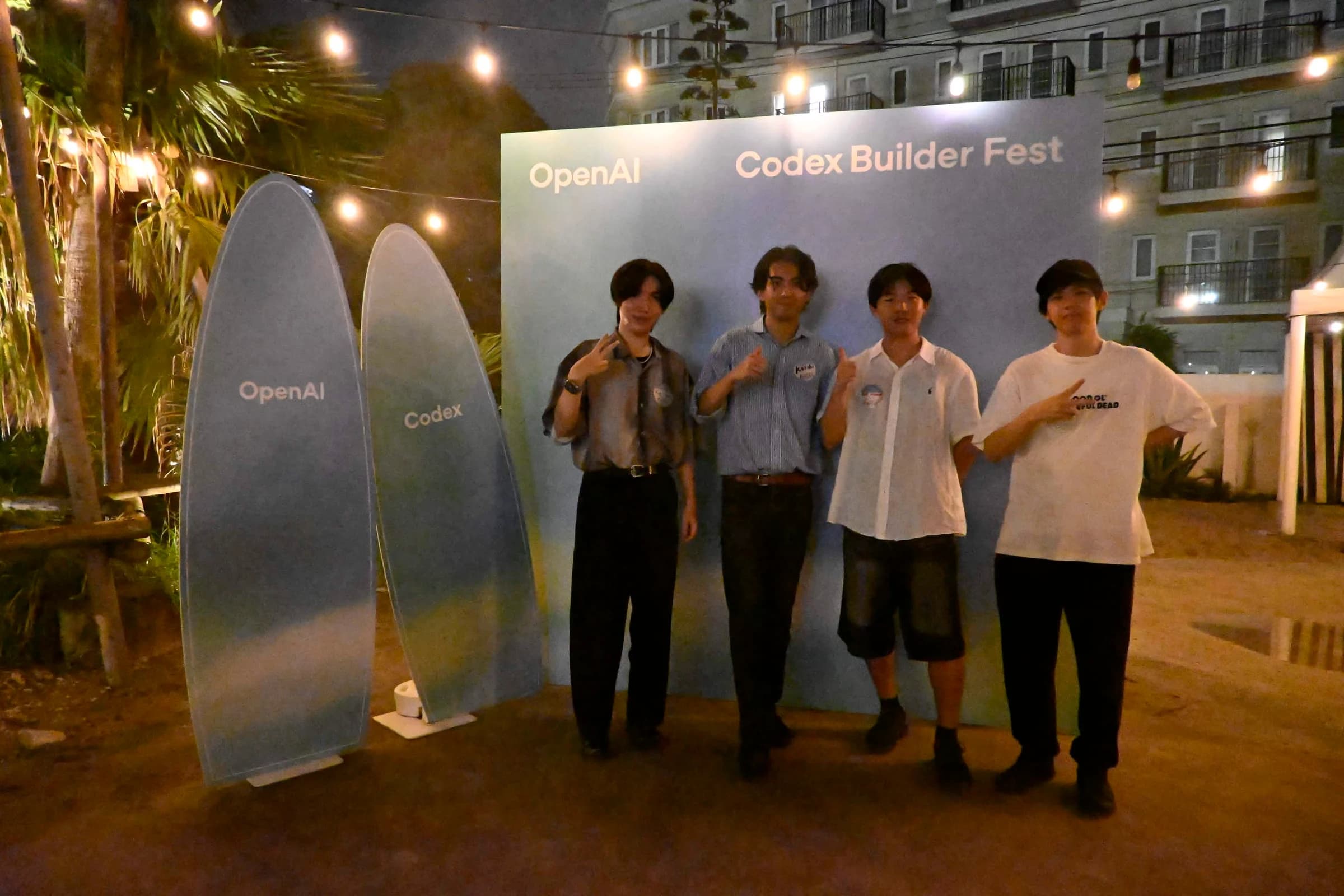
The venue was THE BEACH YOKOHAMA, 3-2-5 Shinyamashita, Naka-ku, Yokohama, Kanagawa 231-0801, Japan.
References and source code
- TableCast GitHub repository
- Architecture specification at the time of the presentation (e9af366)
- Voice integration specification
- Restaurant Codex plugin specification
- TableCast presentation slides
- PR #63: investigating order logs and traces
- Issue #101: authentication and SSR D1 round trips and Worker placement