

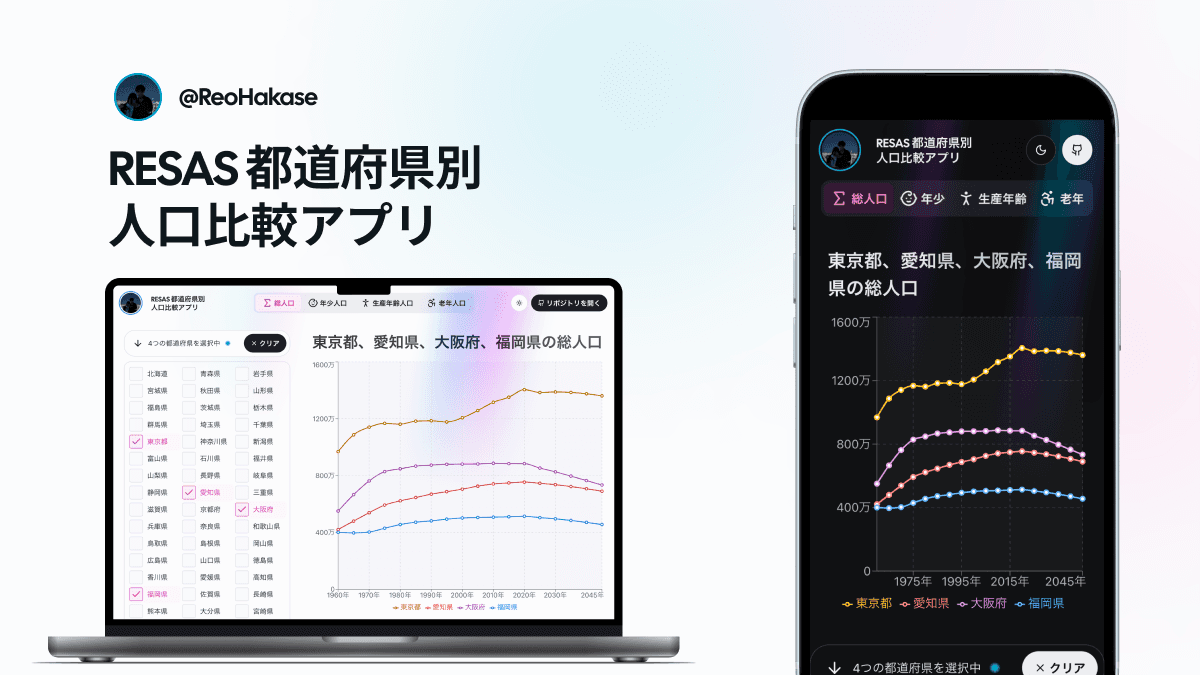
In May 2024, I took on YUMEMI Inc.'s frontend coding test, which was used for its internship and new-graduate selection. My submission was this web application for selecting population data for Japanese prefectures from the Regional Economy and Society Analyzing System (RESAS) and comparing their changes over time.
This was not a team project in which planning or design was divided among members. I handled everything myself: interpreting the requirements, designing the interface in Figma, choosing the technologies, implementing the application, testing it, setting up CI, and writing the documentation. I completed it over six days and approximately 30 hours. The result earned an SS YUMEMI Passport certification and a ¥100,000 prize.
Building a Small Product, Not Just an Assignment
The core requirement was to let users select prefectures and compare changes in their population composition on a chart. Making that genuinely usable also meant considering multi-selection, chart legibility, loading and error states, and operation on mobile screens.
Instead of submitting a screen that merely satisfied the functional requirements, I aimed to complete a small product whose accessibility, design-to-code consistency, testability, and reproducible review environment could all be explained.
I built it before coding agents became as widely adopted in software development as they are today. The only AI assistance I used was GitHub Copilot's Tab-completion model. I did not delegate the interpretation or design to AI; I remained responsible for every decision and every part of the implementation.
How the Technology Stack Worked Together
- Next.js 14 App Router / React Server Components: kept access to the RESAS API and data transformation on the server so that the API key never reached the browser.
- TypeScript / Zod: validated URL parameters, prefecture codes, statistical categories, and external API responses at runtime before data reached the chart.
- Figma Variables / Panda CSS: modelled light and dark colours as role-based tokens shared by the design and implementation.
- Recharts: rendered a responsive line chart with a stable colour assigned to each prefecture.
- Vitest / Storybook / Playwright: tested data transformations, isolated components, and complete browser journeys at separate layers.
- Turborepo / GitHub Actions: automated the monorepo build, linting, unit tests, Storybook tests, and E2E tests for every pull request.
What I Focused on in the Implementation
Validating External Data as Well as Hiding the API Key
I centralised RESAS API requests in a server-side module called from Server Components. The API key was read from an environment variable and sent in the request header, while responses were cached for 24 hours.
const response = await fetch(endpoint, {
  headers: {
    "X-API-KEY": env.RESAS_API_KEY,
  },
  next: {
    revalidate: 3600 * 24,
  },
})

const result = rawFetchResultSchema.parse(await response.json())
I did not treat a successful JSON response as trustworthy data. Zod validated the status, population values, rates, years, and statistical labels. The Japanese labels returned by the API were converted into internal typed values before being passed to Recharts. That made malformed API data an explicit boundary error rather than a broken chart discovered later in the rendering path.
Making the URL the Comparison State
The selected prefectures and statistical category were reflected in the URL instead of being kept only as transient interface state.
/all?prefCodes=8,12,13Opening this URL restores a comparison of the total populations of Ibaraki, Chiba, and Tokyo. The same conditions also generate the page title and Open Graph metadata, so a shared URL communicates what is being compared before the recipient opens it.
On the server, Zod validates statLabel and prefCodes, and the application constructs a title containing the relevant prefecture names. Deriving the visible state, URL, and metadata from the same input prevents the shared preview from drifting away from the page content.
Sharing Design Tokens Between Figma and the Application
I defined the light and dark themes in Figma Variables as roles for backgrounds, text, borders, and interaction states, then mapped them to CSS Variables and Panda CSS tokens and recipes. Individual components did not own arbitrary colour values, so contrast and state presentation could be reviewed under the same rules in both themes.
The application displayed Skeletons for all 47 prefectures while their data loaded and separated the chart behind a Suspense boundary. A sticky state bar beneath the header kept the current selection count and clear action available on narrow screens. The measurement saved in the README recorded a PageSpeed Insights accessibility score of 100.
Giving Each Test Layer a Clear Role
Rather than increasing the number of tests without a plan, I separated them so that a failure pointed to the responsible layer.
- Vitest covered API-response transformation, extraction by statistical category, and title generation from prefecture names.
- Storybook isolated the appearance and interaction of components such as Checkbox, Select, Chart, and navigation.
- Playwright verified in a browser that selecting a prefecture updated the URL, a shared URL rendered four chart lines, and the clear action removed the selection.
GitHub Actions ran Build, Lint, Unit Test, Storybook Test, and Playwright E2E as independent jobs. I also supplied the README, development container, and runtime version declarations so that the review environment was part of the submission rather than an undocumented local setup.
What the Reviews Confirmed
The reviewers listed the custom interface, caching, error and loading states, component separation, tests, CI, API-key handling, and semantic HTML among the project's strengths. Two lines from the original feedback stood out to me:
“An exceptionally high-level response was completed in the short span of 30 hours.”
“The reviewers were unanimous in rating it very highly.”
I understood this as recognition not only of the completed features but also of the way I carried the work consistently through design, tests, and documentation within a limited timeframe.
The coding check in Issue #186 records the following later assessment of the public repository:
- Overall rating: S
- Score: 28.5 / 33.5
- Required items: 13/13 (100%)
- Good items: 32/41 (78%)
- Improvement items: 2
This check again recognised the Server Components architecture, 24-hour caching, tests at multiple levels, UI and UX, and API-key handling. It also identified two remaining issues: the checkbox labels did not show a cursor indicating that they were clickable, and selecting a checkbox on the home page did not change the displayed content. The result taught me that a feature is not enough unless the interface makes the outcome of an action immediately clear.
Ultimately, the submission earned me an SS YUMEMI Passport certification. The recruitment page at the time described SS as being ready to perform at YUMEMI's professional grade and assigned it a ¥100,000 prize. The certification also qualified me to proceed to the first interview in the new-graduate selection process without retaking the coding test.